Bill Pay
Our Bill Pay Service in online banking is a convenient way to pay bills any time, any where.
- It's easy. Setting up and paying bills online is simple & fast. Funds come directly from your checking account.
- It saves you postage. Save over $50 a year if you pay 10 bills a month.
- Use it as often as you like. There’s no limit on the number of bills you pay for free.
- It's convenient. Choose payment frequency options: one-time, monthly, weekly, quarterly, and more.
- It’s safe. Paying bills online is safer than mailing personal checks.
Sign up for Bill Pay today!
Start by enrolling in online banking. Then, once enrolled and logged in to online banking, select 'Bill Pay' from the menu.
How it works:
The first time you log into the Bill Pay service:
- Use a desktop computer to accept your Bill Pay disclosures. These cannot be accepted within the mobile app.
- You’ll need to “allow cookies” to use Bill Pay. These are typically found in your settings for your internet provider.
- Set up your personal list of merchants and other payees with the account numbers and addresses you have with each merchant (you’ll need copies of your current bills to do this)
- When you're ready, schedule a one-time or recurring payment to come from your VACU checking account
- You can add new payees or make changes to your payees when needed
- You can also enroll in eBills to view your bills from participating companies
Bill Payments are made to pay your bills in one of three ways:
- Electronic payments to merchants on the electronic network
- Paper payments drawn off your account to merchants who do not yet accept electronic payments
- Payments to individuals will be sent by draft check drawn off your checking account
FAQs
Why won’t Bill Pay open when I select it?
If you are having trouble accessing Bill Pay, then you may need to disable your browser’s pop-up blocker.
How do I sign up for Bill Pay if I haven’t used it before?
It’s easy. Start by enrolling in online banking. Then, once enrolled and logged in to online banking, select 'Bill Pay' from the menu.
How do I add a payee?
How do I set up a payment?
How do I set up a recurring payment?
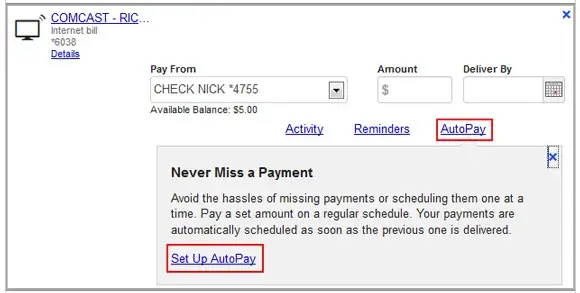
In the Payment Center, under the amount, click on "AutoPay." This will give you the option to make reoccurring payments of the same amount.
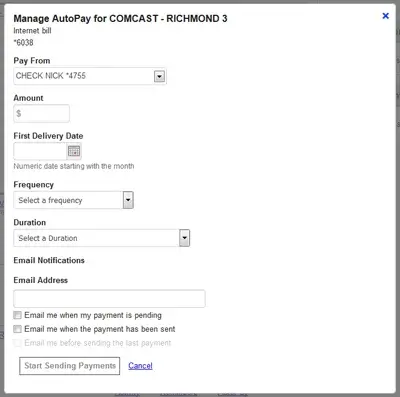
When setting up AutoPay, you can specify the first delivery date, frequency of the payments, duration of your AutoPay rule and set up email notifications for your reoccurring payment. This is especially helpful for payments that do not change from month-to-month, such as mortgage payments, loan payments and rent.
Can I use different checking accounts to pay different bills?
Yes, if multiple accounts are available, select the account from which you would like the payment to be made.
Can I make a payment from my savings account?
Bill payments must be made from a checking account.
What should I do if one of my payees notifies me that a payment has not been received?
Confirm that the transaction was deducted from your account and view the payment in Activity. If the payment is not credited after two days, call the company’s customer service line. If the problem isn’t resolved, you can send a payment inquiry on the payment in Activity, or contact Bill Pay Member Service at (844) 699-1087.
How do I avoid late payments?
Our Bill Pay service allows you to schedule your bills in advance of your payday to be delivered on your payday. We recommend setting up your payments at least five business days in advance of the due date on your bill to ensure on-time delivery.
Be sure to set your "deliver by" date to a date that is on or before the bill is due and by which the funds will be in your account in order to avoid overdraft and/or late fees.
If the due date of your bill falls on a non-business day, you should schedule your "deliver by" date at least one business day prior to the due date.
What is the payment guarantee?
We will refund up to $50 in late fees for payments that are not received on or by the requested deliver by date.
The payment guarantee is not applicable to payments and addresses outside of the United States, state and federal tax payments, or court-ordered payments.
Please note that the payment guarantee also does not cover those payments that are scheduled after their due date, i.e. during the grace period. If the due date of your bill falls on a non-business day, you must schedule your "deliver by" date at least one business day prior to the due date.
Where are my pending payments?
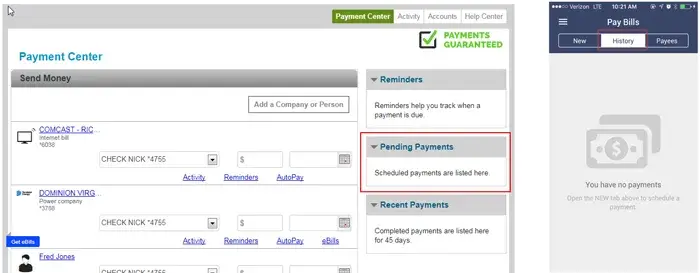
Within online banking, pending payments can be found on the right-hand side of the screen.
In the VACU Mobile Banking App, pending payments are found under "History".
Why are the funds still in my account after I’ve set up a payment?
Scheduled payments are kept in your account until the "deliver by" date. Accounts paid electronically will have funds removed on the "deliver by" date. Accounts paid with a draft check will have funds removed from your account when the check has been deposited or cashed.
Why are checks being mailed instead of transferred electronically?
Payments made to individuals, small businesses, and certain companies will be mailed via paper check rather than paid electronically.
Are there any types of payments that cannot be made through Bill Pay?
Payments to companies outside the U.S. cannot be made through Bill Pay. Tax payments, court ordered payments and payments to collection agencies can be made, but our payment guarantee is not available on these types of payments.
What happens if my payment falls on a non-business day (a holiday, weekend, etc.)?
Payments scheduled for a weekend or holiday will be processed one business day prior to the chosen "deliver by" date.
What are eBills?
An eBill is an electronic version of a bill or statement. The eBill typically contains the same info as a paper bill or statement. You can receive, view, and pay eBills in Bill Pay. When your eBill arrives, it appears in Payment Center. You control the date and amount of your payment.
How do I start using eBills?
When you add a company that offers eBills, you can enter the required info to request eBills, and a request is sent to the company. When you complete the request for one company, you can sign up for eBills from other companies who offer them. To add an eBill for a company you’re already paying, look for the eBill options on the Payment Center.
Can I cancel a scheduled payment after I’ve set it up?
Yes, you can make a change to any payment that has not started processing.
What if I need to make an emergency payment?
A rush delivery payment option is available. The fee for this special service is $9.95 for same-day electronic payments and $14.95 for overnight paper check delivery.
Bills that allow this service will say “Rush Delivery” beneath the date on the Payment Center. You can click on that link and choose the same or next day for rush delivery payments.

Who can I contact for other Bill Pay questions/issues?
You can contact Bill Pay Member Services at (844) 699-1087 from 7 am – 1 am ET, seven days a week.